
APIX.XL relies on a licensing service to validate the license.
Licensing service comes with the following hosting options.
Ness Hosted: APIX.XL connects to the service hosted at https://licensing.apixhub.com
Client Hosted: Ness provides the installers to the client to host the licensing service on the intranet.
Licensing Workflow:
- Each time Excel starts, APIX.XL communicates with the license server to obtain a license.
- If a license is unavailable, a message will inform the user and APIX.XL will not work.
- If a license is obtained successfully, it is valid for 48 hours unless Excel is closed.
- After 48 hours, APIX.XL will communicate with the license server to restore the license.
- In case the license server is unreachable, the user will be notified and APIX.XL will extend the validity of the license by 48 hours. This ensures that the users are still able to use the application even if the license server is unavailable.
- License is automatically released when Excel closes.
- Users can obtain or release a license on demand by clicking on the Release License and Restore License buttons on the APIX.XL Ribbon respectively.
Licensing service can be set up in one of the following ways:
- License Server hosted by Ness.
The license server is hosted on the web and APIX.XL communicates with the license server directly.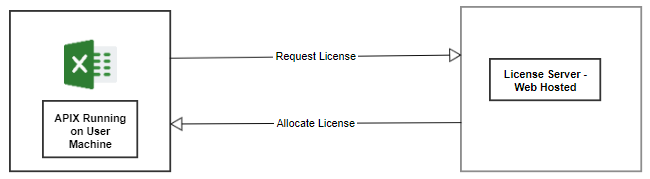
- License Server hosted by Ness with a proxy forwarding service hosted by the client.
The license server is hosted on the web and the client implements a proxy forwarder that redirects calls to the license server. APIX.XL communicates with the proxy forwarder to obtain and release licenses.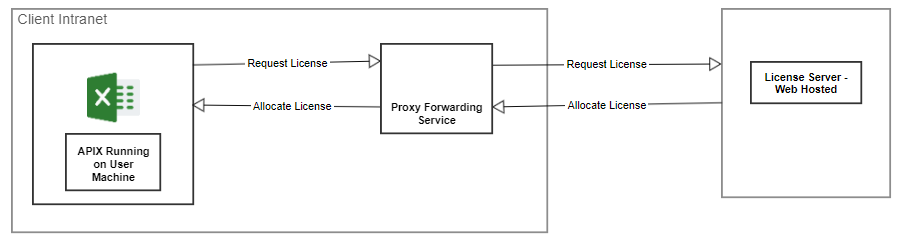
- License Server hosted within client's environment (intranet).
In cases where users are restricted from accessing the internet, a license server can be hosted on a Windows machine with a fixed IP address within the intranet. APIX.XL will communicate with the license server to obtain and release the license.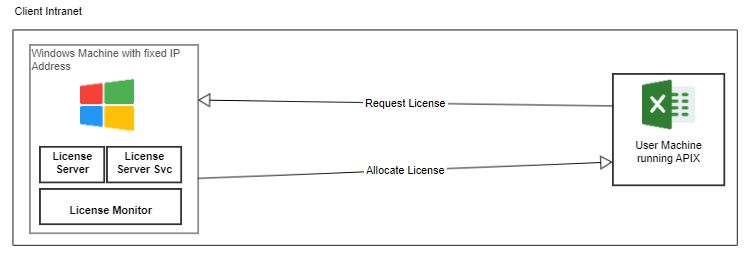
Comments
0 comments
Please sign in to leave a comment.